
Human handover
When the agent brings someone from your team into a conversation: who is told, where you see it, and how to close it.
What triggers a handover
The agent hands a lead to your team when, for example:
- the buyer asks to speak to a person;
- the buyer has a complaint;
- the buyer asks for something the agent can't give, such as a price it doesn't have on record or a fact your knowledge doesn't contain;
- on a call-script campaign, the lead reaches an ending your script hands to the team, such as shows interest.
The buyer is told a colleague will follow up. The agent keeps replying to them in the meantime: a handover adds a person, it doesn't silence the agent. The agent knows a colleague is involved, so it won't keep announcing it and won't claim your colleague has already called.
Who is paged
Handovers go to the sales reps on your Sales team, one at a time, in turn. The rep paged longest ago gets a WhatsApp message with the lead's name, phone number, project and the reason to call. They can tap Send full summary to take the lead, or Not available to pass it to the next rep. If every rep passes, paging stops and the lead shows as needing attention.
There is no time limit: a page waits until the rep taps a button. If a campaign names its own reps, only they are paged for its leads; a lead from no campaign goes to your whole team.
If a buyer asks for a person outside your team's hours, nobody is woken: the handover is queued and the first rep is paged when your team's day starts. Other handovers are paged straight away.
For setting up your team and what their messages look like, see How escalations are paged and Out-of-hours handoffs and the morning queue.
Where you see it
Needs your team on the leads list shows every lead handed over and not yet resolved. The number beside All leads in the menu counts them.
In the list, the lead's status is With your team and the Owner column names the rep and what happened:
| Owner shows | Meaning |
|---|---|
| A rep's name, Paged 8 h ago · no reply | The rep was paged and hasn't tapped anything yet. |
| A rep's name, Took the lead | The rep tapped Send full summary; the lead is theirs. |
| A rep's name, Passed on it | The rep tapped Not available. |
| Nobody paged, No sales rep to page | There was no active rep, so the request reached no one. Add reps on the Sales team page. |
| AI agent, Handoff queued for opening time | They asked for a person out of hours. Their status stays With agent until your team opens and the first rep is paged. |
Click the lead's name to see the handover in the side panel, with Mark handoff resolved. See The side panel.
On the lead's own page:
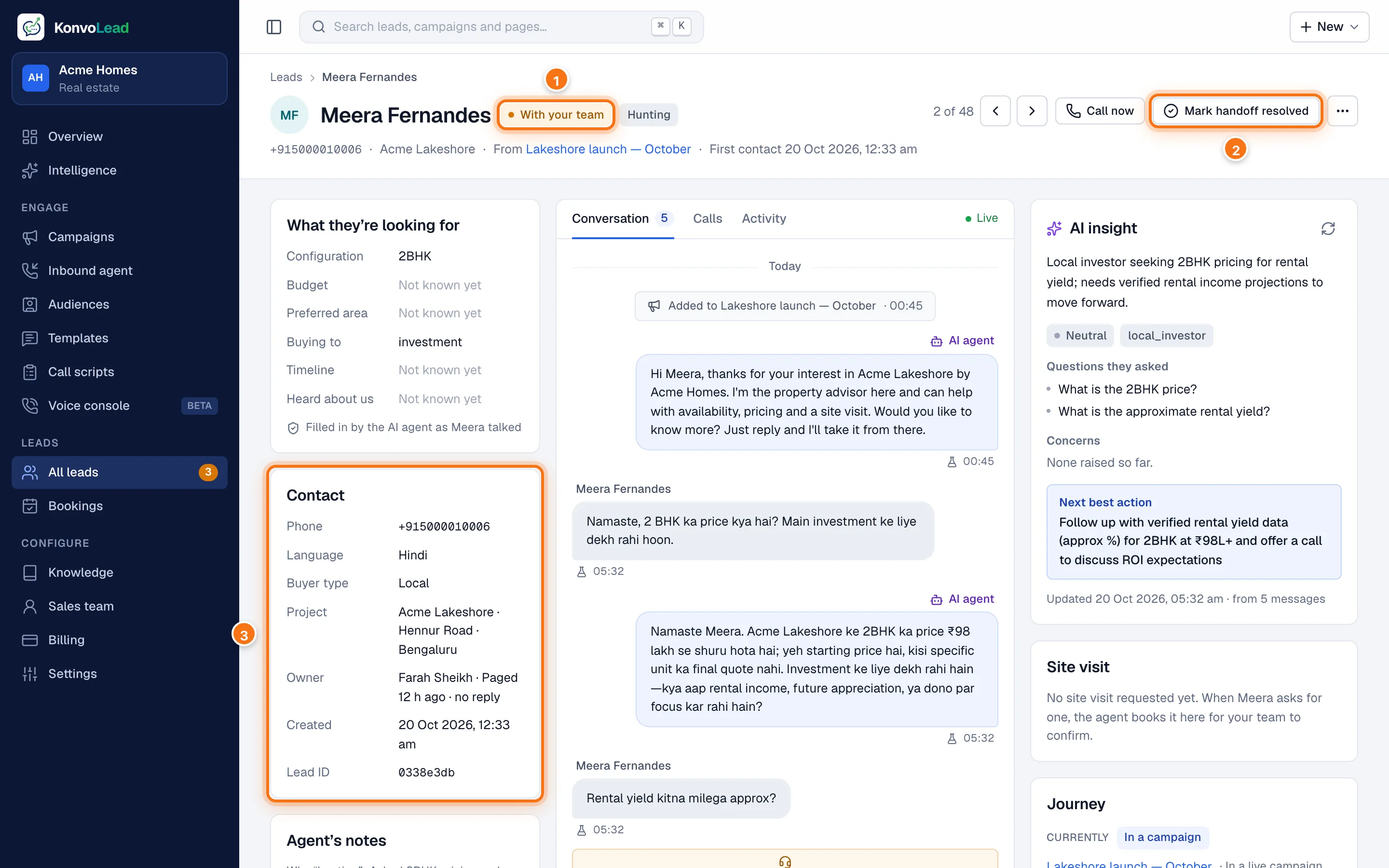
- The status With your team.
- Mark handoff resolved. See below.
- Owner names the rep and where the page stands.
Further down, the Handover card says why the lead was handed over and lists every rep paged, in order:
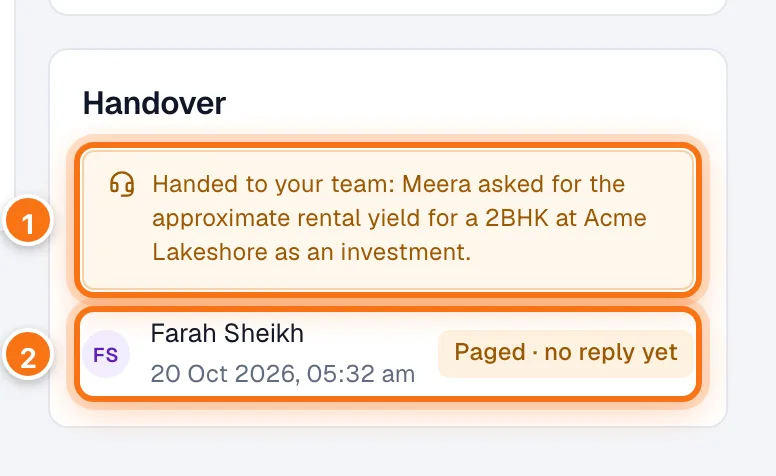
- Why: the reason the agent gave when it handed the lead over.
- Each rep paged, when, and what they did: Paged · no reply yet, Took the lead or Not available.
The lead's Activity tab has the same events with their times.
Mark handoff resolved
When your colleague has finished with the buyer, click Mark handoff resolved on the lead's page or in the side panel. To close several at once, tick them in the list and use Mark handoff resolved in the bar that appears. Resolving:
- closes the open handover;
- sets the lead back to With agent, or Booked if a confirmed visit is waiting;
- lets campaigns message or call the lead again. While a lead is with your team, campaigns skip it: a message or call that falls due in that time isn't sent later, and that campaign doesn't contact them again.
For a handover still queued for the morning, the button reads Cancel queued handoff, and it cancels the page.
You don't need to resolve anything for the buyer to get replies: the agent serves them either way.
When the buyer writes again
If a handed-over buyer writes again while the handover is open, the agent reassures them and the rep who has the lead is reminded on WhatsApp, with the same message saying the buyer followed up. A rep is reminded at most once every 4 hours. If every rep passed, nobody is reminded, so keep an eye on Needs your team.
A handover is resolved only on the dashboard: a rep can't close it from WhatsApp.