
Reading inbound analytics
Where your inbound figures are and what each one means.
Inbound figures are on Overview, in the Inbound enquiries section near the bottom. Inbound performance on the Inbound agent page takes you straight there. They follow the period chosen at the top of Overview, and leave out test leads unless you switch on Include test leads.
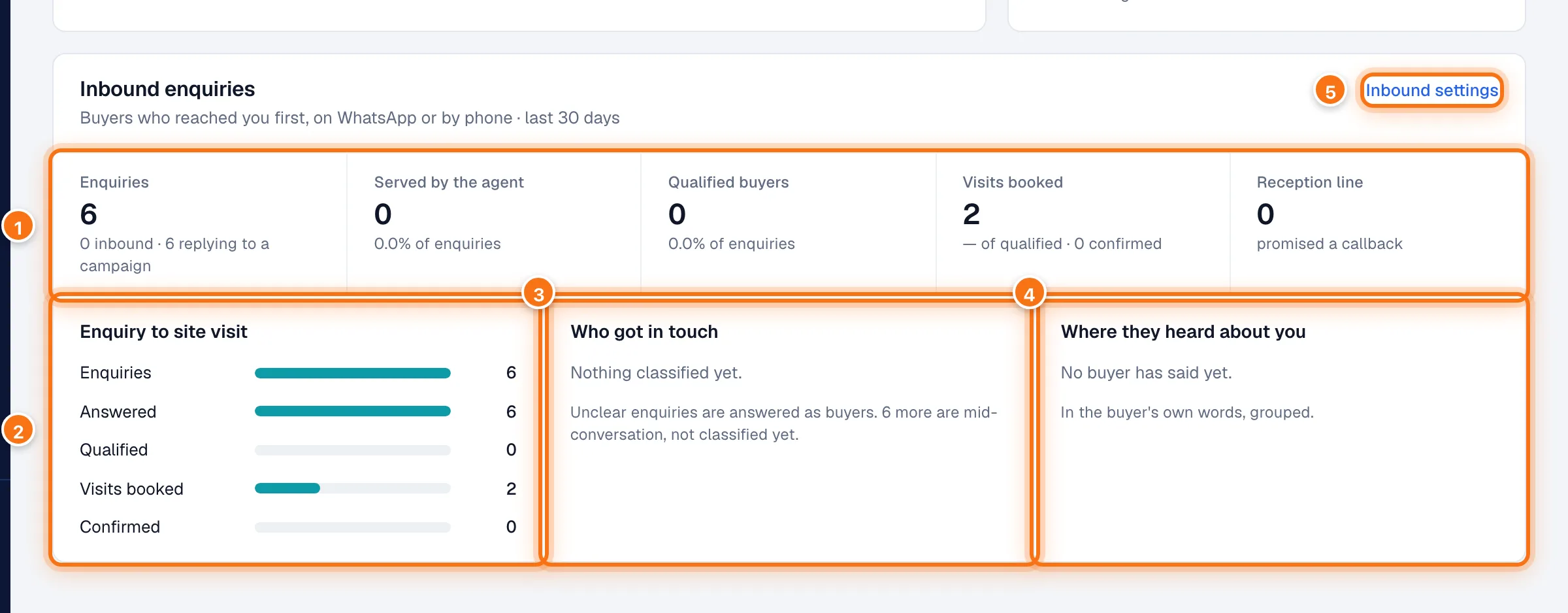
- The headline figures. See below.
- Enquiry to site visit: each step's own count, from enquiries to visits your team confirmed.
- Who got in touch: how enquiries were sorted: buyers, brokers, existing customers, job seekers and vendors, spam. See Who the agent serves.
- Where they heard about you: the agent asks new enquirers once, naturally, how they heard about you. Their answers are grouped here in their own words.
- Inbound settings goes back to the Inbound agent page.
The headline figures
| Figure | What it means |
|---|---|
| Enquiries | Conversations started by someone contacting you. Someone who messages in the morning and calls in the afternoon is one enquiry, not two. Underneath: how many were true inbound, and how many were people replying to a campaign. |
| Served by the agent | Enquiries the full AI agent handled. |
| Qualified buyers | Enquiries judged to be genuine buyers. |
| Visits booked | Site visits requested from these enquiries, and how many your team has confirmed. |
| Reception line | Enquiries the agent didn't take, for example because Inbound was off or the project wasn't covered. They were promised a callback and your team was paged. |
Enquiry to site visit
- Enquiries: everyone who got in touch.
- Answered: those who got a reply.
- Qualified: those judged to be genuine buyers.
- Visits booked: those who asked for a site visit.
- Confirmed: those whose visit your team confirmed.
For the rest of Overview, see Overview and Buyer Intelligence.