
What KonvoLead does
KonvoLead gives your business an AI sales agent that talks to your leads on WhatsApp and on the phone, answers from the knowledge you give it, and hands interested buyers to your team.
In short
The agent:
- Answers enquiries on WhatsApp and on phone calls, any time of day, in the buyer's language.
- Reaches out to lists of leads you upload, with a WhatsApp message, a phone call, or both.
- Answers only from what you give it. It reads your brochures, price sheets, websites and notes. It doesn't make up prices, offers or promises. When it doesn't know something, it says so and offers a colleague.
- Hands interested buyers to your sales team. When a buyer asks for a person, the agent messages one of your sales reps on WhatsApp with the buyer's details.
- Keeps a full record. Every conversation, call and detail the agent learned about a buyer is on that lead's page.
Find your way around
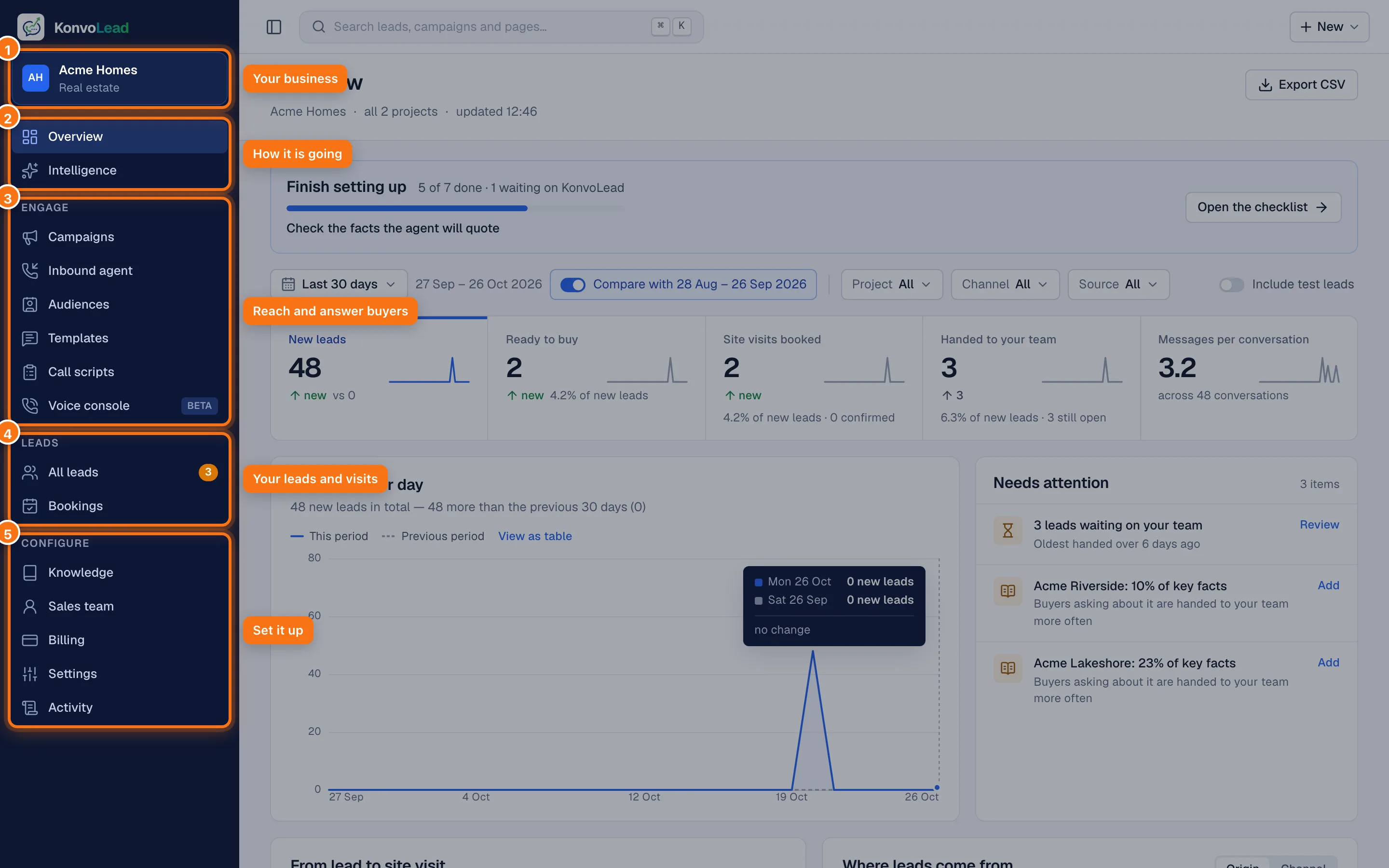
- Your business. The name of your account and what you sell.
- Overview and Intelligence: how things are going, and what buyers ask for.
- Engage: everything that reaches buyers. Campaigns reach out to a list, the Inbound agent answers people who contact you first, Audiences are your lists, Templates are your WhatsApp messages, Call scripts are what a calling agent says, and the Voice console lets you test calls.
- Leads: All leads and Bookings (site visits and other appointments).
- Configure: Knowledge (what the agent knows), Sales team, Billing, Settings, and Activity: everything done in your account, by your team and by KonvoLead. At the foot of the menu, Help & docs opens these pages, and clicking your name lets you sign out or switch between light and dark.
Press ⌘ K (Ctrl K on Windows) anywhere to search leads, campaigns and pages. + New at the top right starts a campaign, an import, a message or a project.
Your Overview
Overview is the first place to look each day.
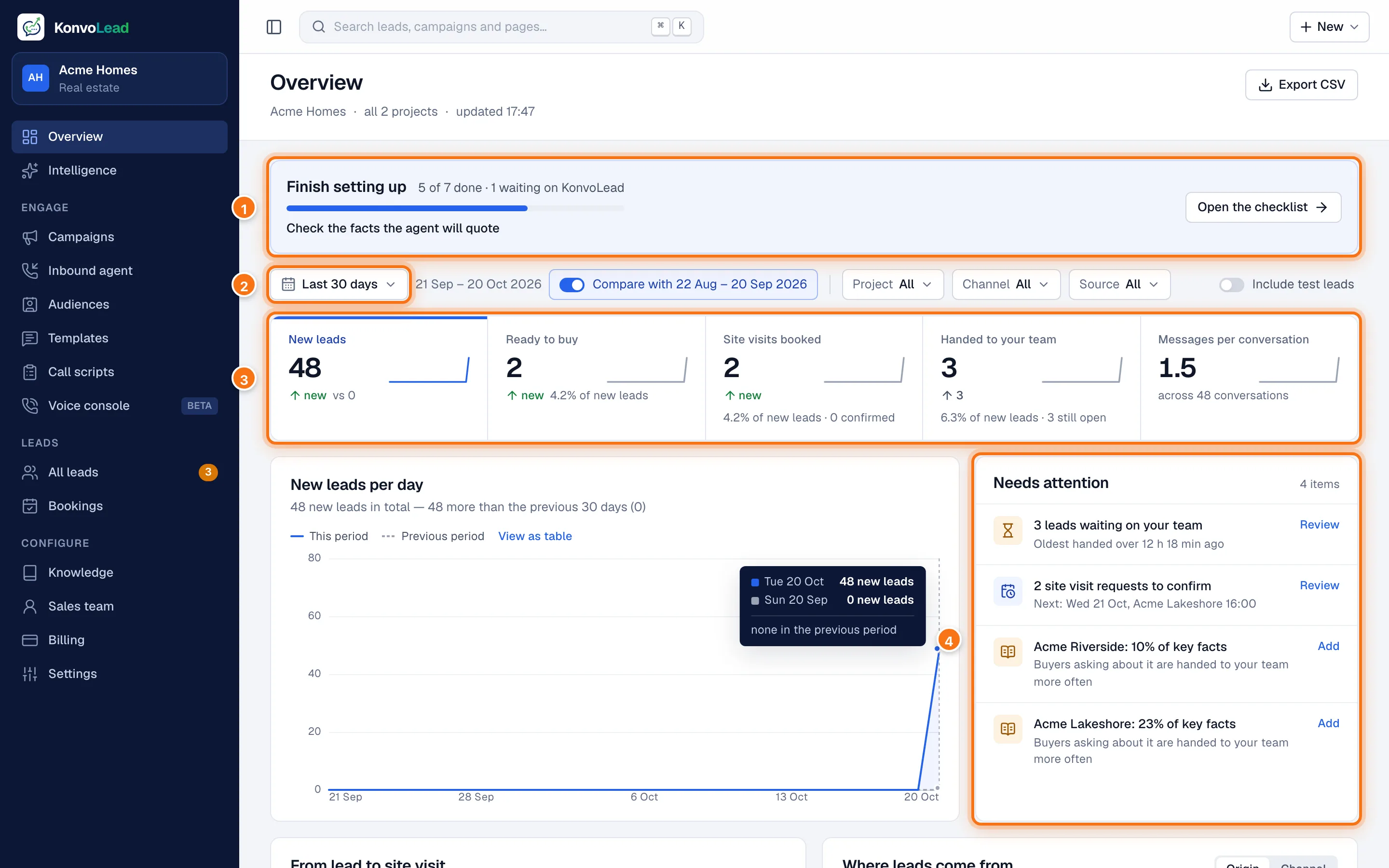
- Finish setting up shows until your account is fully set up. Click Open the checklist to see what's left. See The welcome checklist.
- The period the page covers. Pick another, or compare with the period before.
- The headline numbers: new leads, leads ready to buy, site visits booked, leads handed to your team, and how long conversations run.
- Needs attention: leads waiting on your team, visit requests to confirm, and gaps in your knowledge. Click Review to go to them.
Further down are the steps from lead to site visit, where leads come from, your campaigns, the languages buyers use, and enquiries that came to you first. Test leads are left out unless you switch on Include test leads.
Two ways a conversation starts
| Inbound | Outbound | |
|---|---|---|
| Who starts it | The buyer messages or calls your number | You run a campaign that messages or calls them |
| Where you set it up | Inbound agent | Campaigns and Audiences |
| Typical use | Ads, your website, walk-ins who were given your number | Old enquiries, event sign-ups, a new launch to past buyers |
Either way, once the buyer replies, the same agent carries on the conversation.
Two channels
- WhatsApp. The agent replies in the chat. It can also send a floor plan, a brochure or a video link when you allow it (see Media).
- Phone calls. The agent speaks on an ordinary phone call, from the same knowledge.
A campaign can use one channel or both: for example, a WhatsApp message first, then a call to anyone who hasn't replied.
What you do, and what the agent does
You:
- Give the agent its knowledge: documents, websites, notes. See How the agent answers.
- Check the important facts, especially prices.
- Add your sales team, so handoffs reach a person.
- Import a list and run a campaign, or turn on the Inbound agent.
The agent:
- Answers questions, learns what the buyer wants (budget, size, timeline) and records it.
- Asks for site visits or call-backs, which your team then confirms.
- Hands the buyer to your team when they ask for a person, or when it can't help.
Which businesses it serves
KonvoLead works for several kinds of business, and the screens use your industry's words. A real-estate business sees Project, a lender Loan product, a card issuer Card and a car dealer Model. These pages say project for any of them. See the Glossary.