
Calling
How campaign calls are placed, automatically or by hand. Also when they happen, how often an unanswered number is tried again, and what happens with voicemail.
A campaign with Calls only, WhatsApp, then a call or Call, then WhatsApp makes calls. When a call is due, it waits on the campaign's Call queue tab.
The Call queue
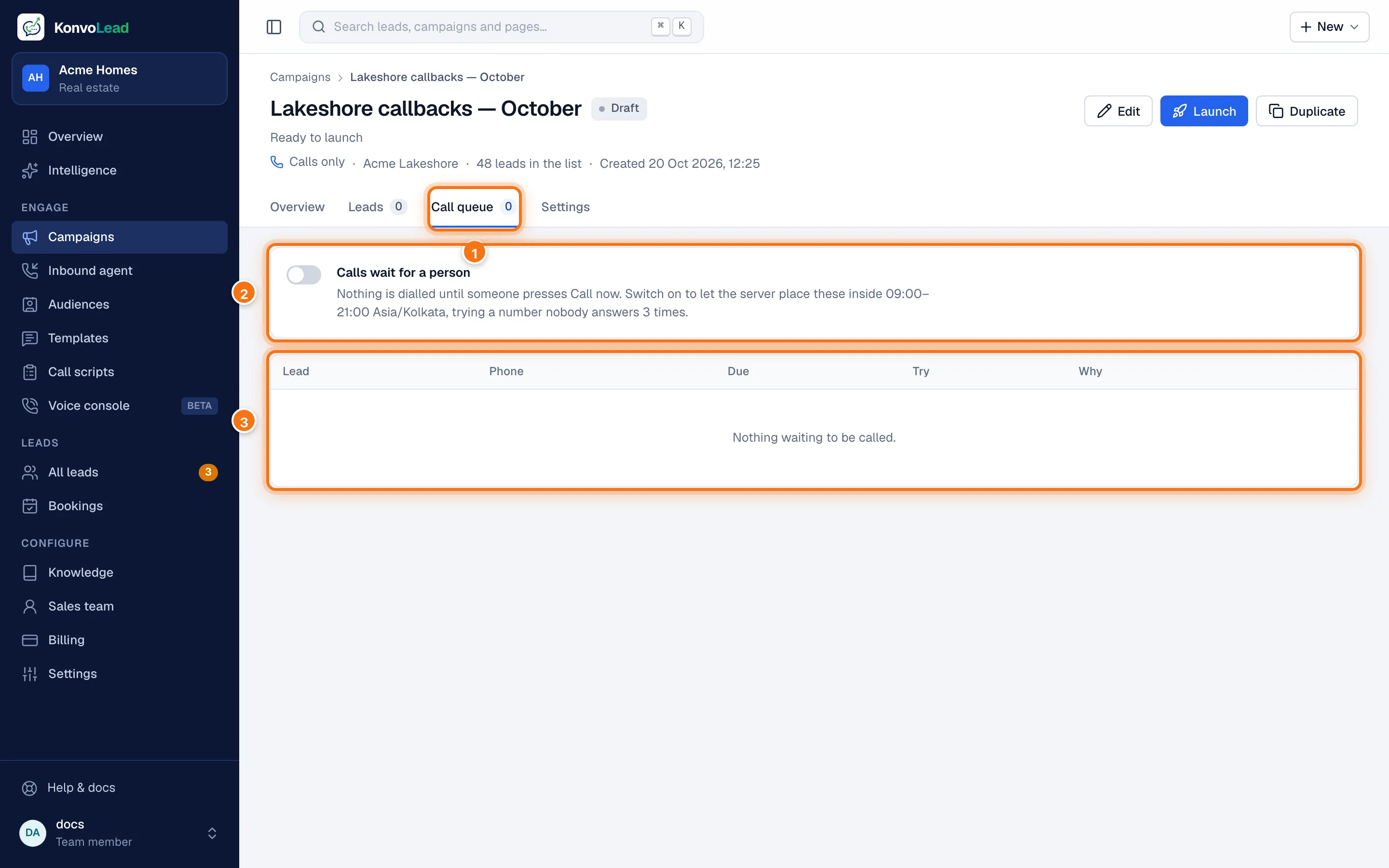
- Call queue: the tab, with how many calls are waiting.
- The automatic dialling switch, which reads Dialling automatically or Calls wait for a person, and what it means for this campaign: when calls may go out, and how many times a number nobody answers is tried.
- The calls waiting: each lead, their number, when the call is Due, which Try it is (for example 2 of 3), and Why it's queued (for example no reply on WhatsApp). Each due call has Call now.
Automatically or by hand
| By hand (the default) | Automatically | |
|---|---|---|
| Who places the call | Someone on your team, with Call now | KonvoLead, on its own |
| When | When you click Call now | Between 9:00 and 21:00 in the campaign's timezone, inside its send window if that's narrower |
| How many at once | One at a time | A couple at a time |
You choose in the campaign form with Dial calls automatically, and can switch it on or off at any time on the Call queue tab, even after launch. Switching it off doesn't stop the campaign: every queued call waits for a person. If automatic dialling is on but paused for a reason, for example outside calling hours, the tab says Not dialling right now and why.
Call now rings the lead straight away from your business number. The button shows Calling… while it dials.
Checks before every call
Whether placed automatically or by hand, a call doesn't go ahead if, at that moment:
- the person has opted out;
- your team has taken the lead over;
- the number belongs to someone on your own sales team;
- they're already on a call with us;
- another campaign contacted them too recently (the contact cooldown);
- your Calls wallet can't cover a minute of the call. See Wallets and billing.
If the reason will pass (the cooldown, a call already in progress, an empty Calls wallet), automatic dialling waits and tries again later. If it won't (an opt-out, a lead your team has taken over, your own sales team's number), the call is taken out of the queue. A person pressing Call now sees the reason instead, and the call stays in the queue.
⚠️ Outside calling hours (9:00 to 21:00, inside the campaign's send window if that's narrower), Call now first warns you, with the time now and the allowed hours. It calls only if you press Call anyway. Please only call within calling hours.
When nobody answers
If a call ends with no answer, busy or voicemail, the number is called again later:
- Tries per number: 3 in total by default.
- Hours between tries: 24 by default.
Change the defaults on Settings, or for one campaign in the campaign form. A call that connected and had a conversation isn't tried again. After the last try with no answer, the lead is marked Not reached. On a Call, then WhatsApp campaign, the WhatsApp message goes out Switch after hours (24 by default) after the first call was due, if they haven't replied, even if more call tries are still to come.
Voicemail and call screening
If a call reaches a voicemail greeting or an automatic call-screening assistant, the agent recognises it, stops and hangs up. It doesn't leave a message. The call counts as unanswered: the number is tried again on your schedule, and the lead isn't counted as having replied.
How a call ends
- The buyer says goodbye, or asks to end the call: the agent finishes its sentence and hangs up.
- The buyer goes quiet: the agent asks "are you still there?", and hangs up if there's still no reply.
- The agent hands the lead to your team: it tells the buyer a colleague will be in touch, then ends the call.
- A call can't run longer than 10 minutes.
What the lead hears
Their phone shows your business's number. When they answer, the agent says your opening line exactly as written, in the call's language, then talks with them naturally. A knowledge agent answers from your project's knowledge; a qualifying agent from your script. It switches language if the buyer does.
Nothing about who is calling, or that it's AI-assisted, is added to your opening line. If you record calls, "This call is recorded for quality purposes." is added after its first sentence. If you want callers told the call is AI-assisted, or who is calling, write it into What the agent says first in the campaign form.
Where to see what happened
Each lead's page lists their calls, with how each one ended, how long it lasted, and the full conversation. See A lead's page.