
The welcome checklist
When the first login set up for your company signs in, KonvoLead shows a checklist of what has to be in place before the agent talks to buyers. Each step ticks itself when it's done. You never tick anything by hand.
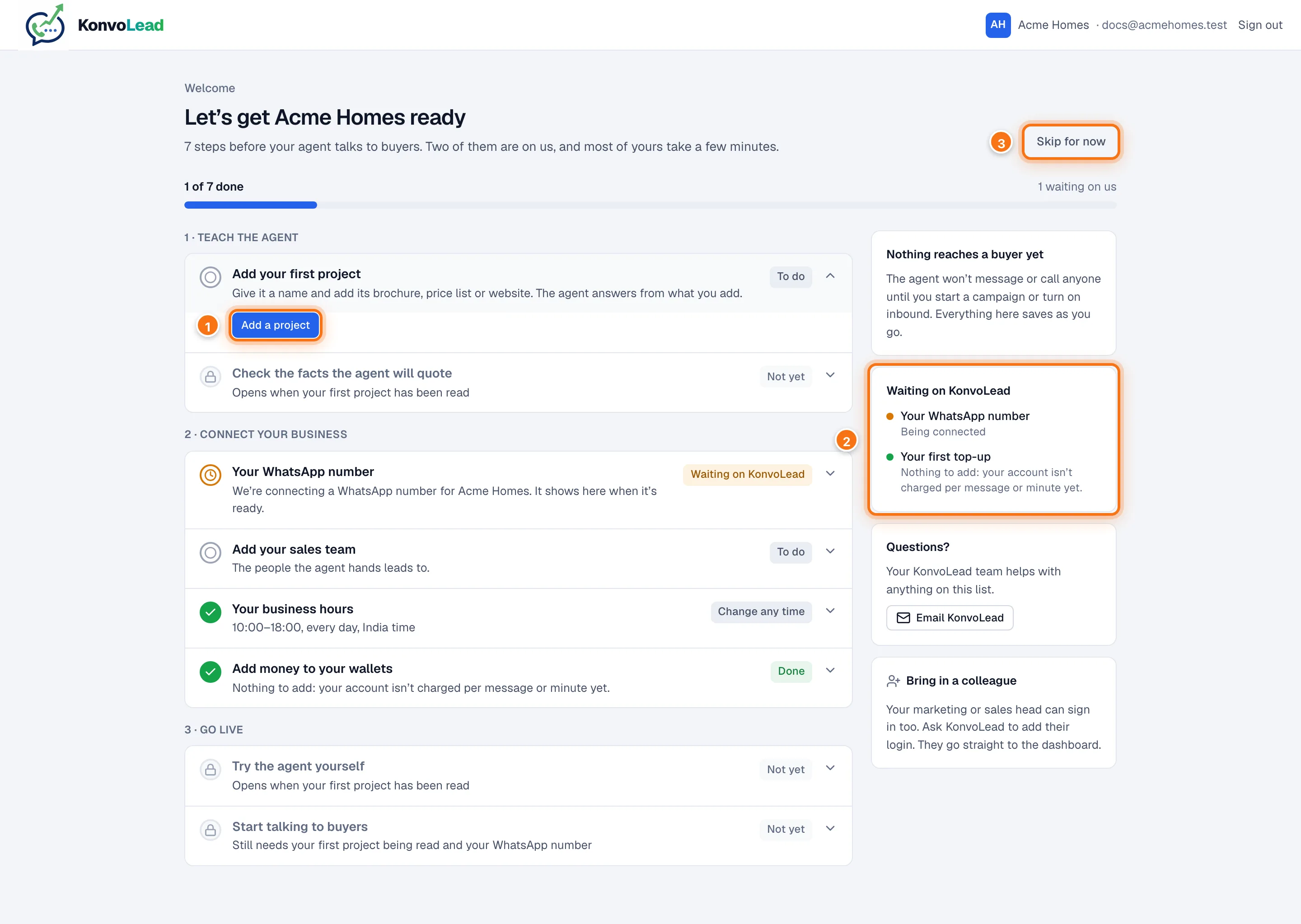
- Most steps have a button that takes you to the right page. A step that's waiting on us, or already done, has none. Click a step's row to open or close it.
- Waiting on KonvoLead lists the steps that are ours: connecting your number, and your first top-up.
- Skip for now takes you into the app. You can come back to the list any time.
Who sees it
Only the first login set up for your company is taken to the checklist, each time they sign in, until they skip it or open a step. Colleagues go straight to Overview.
Until every step is done, a Finish setting up card sits at the top of Overview. It shows how many steps are done and your next few. Click Open the checklist to go back to the full list. Once every step is done, the card goes away.
What the step labels mean
| Label | Meaning |
|---|---|
| To do | Yours to do now |
| In progress | Started, for example a project still being read |
| Not yet | Opens once an earlier step is done. The row says which |
| Waiting on KonvoLead | Ours to do. Nothing for you to do |
| Done | Finished |
| Couldn't check | We couldn't load that step just now. Reload the page |
The steps
The steps depend on how your agent works. Most accounts have an agent that answers from your documents. Some have an agent that calls from a script.
Rows marked Change any time or Optional aren't counted in the total at the top.
If your agent answers from your documents
1 · Teach the agent
- Add your first project (for lenders, card issuers and car dealers: loan product, card or model). Give it a name and add its documents or website. KonvoLead reads it in a few minutes, and you can carry on with other steps meanwhile. See Onboarding a project.
- Check the facts the agent will quote. Opens once the project has been read. Confirm the key facts: prices, dates and approval numbers. The agent already answers from them; checking confirms they're right. See Facts.
2 · Connect your business
- Your WhatsApp number. KonvoLead connects this for you. A new business number has to be approved by Meta before it can send messages, so this step can show Waiting on KonvoLead for a few days. You can also connect your own number yourself: see Connecting your own WhatsApp number.
- Add your sales team. The people the agent hands leads to. They get handed-over leads and the morning visit list on WhatsApp, and don't need to sign in. See Adding your sales team.
- Your business hours. Shown, not counted: it reads Change any time. Your hours decide when site visits are offered, when the morning visit list goes out, and when a night-time handoff is sent. They start at 10:00–18:00, every day. Click Change hours to set your own on Settings.
- Add money to your wallets. If your account isn't charged per message or minute, this step is already done and says so. Otherwise KonvoLead adds your first top-up once your agreement is signed. See Wallets and billing.
3 · Go live
- Try the agent yourself. Opens once your project has been read. Try it now opens the Voice console, where you can talk to the agent or have it ring your own phone. You can also chat with it in writing: see Test the agent. Real buyers never see your tests.
- Start talking to buyers. Opens once your project has been read, your number is connected and your first top-up is in. Pick Reach your list to start a campaign, or Answer enquiries to turn on the Inbound agent. If some key facts are still unchecked, the step says so but doesn't stop you.
If your agent calls from a script
1 · Write the script
- Write your call script. On Call scripts, start from a template and change every word, then publish it.
- Try a practice call. Opens once the script is published. Play the lead yourself, or have it ring your own phone.
2 · Connect your business
- Upload who to call. An Excel or CSV file with names and numbers, and how they agreed to be contacted. See Audiences.
- Your calling number. KonvoLead sets this up for you.
- Add money to your wallets. As above.
- Add your sales team. Marked Optional: it's for calls that end with "pass to your team".
3 · Go live
- Your business hours. Shown, not counted. Calls never go out before 9:00 or after 21:00, and a handoff at night waits for your opening time.
- Start your first campaign. Opens once your script is published, your list is uploaded, your number is ready and your first top-up is in.
Skip for now
Click Skip for now at the top of the page, then Go to Overview. Nothing is sent to buyers in the meantime. The list moves to the Finish setting up card on your Overview, so you can finish it any time.
Questions
Click Email KonvoLead on the checklist. To give a colleague a login, ask your KonvoLead contact to add them.