
Campaign types
The four ways a campaign can reach people: WhatsApp, a call, or one then the other. Also, which agent answers.
A campaign reaches out to an audience you imported. As soon as someone responds, the AI agent takes over the conversation. You choose how a campaign makes first contact under How to reach them, on the Channels & message step of the campaign form.
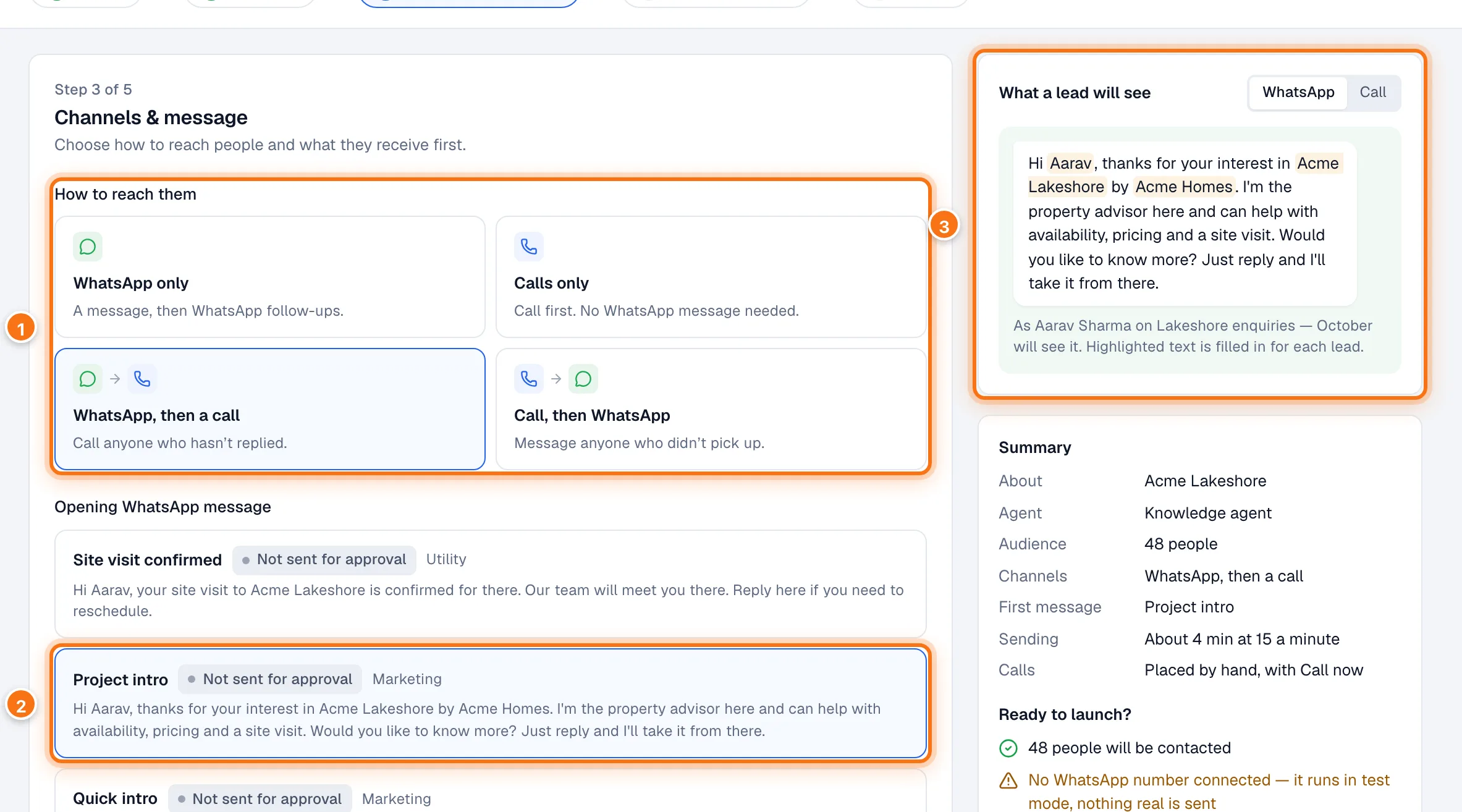
- How to reach them: the four choices below.
- The opening WhatsApp message.
- What a lead will see: the message as the first person on your audience will get it.
| Choice | What happens | Needs |
|---|---|---|
| WhatsApp only | Sends your opening WhatsApp message, then follow-ups to anyone who hasn't replied. No calls. | An opening message (template) |
| Calls only | Opens with a phone call. No WhatsApp message. | No template. A phone number on your account for real calls |
| WhatsApp, then a call | Sends the WhatsApp message first, then calls anyone who hasn't replied. | An opening message |
| Call, then WhatsApp | Calls first, then sends the WhatsApp message to anyone who didn't pick up. | An opening message, for the WhatsApp step |
When to use which
- WhatsApp only: the default and the gentlest. Good for large lists, older enquiries, and people who prefer to read in their own time.
- Calls only: when speed matters and the list is small and warm, for example fresh form enquiries you want to reach today.
- WhatsApp, then a call: the usual choice for a warm list. A message first, then a call for those who didn't reply. It reaches more people without calling everyone.
- Call, then WhatsApp: when a call is the best first touch but many won't pick up. The WhatsApp message catches the rest.
Switching to the second channel
For the two "then" choices, Switch after is how many hours to wait for a response before trying the second channel. Leave it blank for 24 hours, or your default from Settings.
Only people who haven't responded get the second channel. Anyone who replied, said they're not interested, opted out, booked a visit or was handed to your team is left alone. Someone the first channel couldn't reach (for example, nobody picked up) is tried on the second one. That's the point.
What the lead experiences
- WhatsApp: your approved message arrives from your business's WhatsApp number. If they reply, the agent answers straight away, in their language. If they don't, they get up to two follow-up messages. See Creating a campaign.
- Call: their phone rings from your business number. When they answer, the agent says your opening line, then talks with them. If they don't answer, they may be called again later. See Calling.
- Either way: if you've set a gap between campaigns, they won't get two campaigns' opening messages close together, and no campaign opens on someone in the middle of a conversation. See Contact cooldown.
Two kinds of agent
Separately from the channel, you choose who talks to your leads, on the form's first step:
- Knowledge agent: answers from your project's knowledge, books visits and hands leads to your team when they ask. Pick one project under What it's about, or General — everything you sell to reach out for your whole portfolio. A general campaign learns the buyer's area, budget and needs in conversation and recommends from what you sell.
- Qualifying agent: follows a call script you wrote and published. It says only what the script says, and hands the lead to your team as soon as they're interested. No knowledge needed.